Alerts and monetization
Alert Full alert box for follows, subs, gifts, donations, cheers, raids, store redemptions, charity events, and platform-specific alerts.
Alert variations and conditions Media, audio, TTS, avatars, brand icons, amounts, and message templates Support for alerts from every connected streaming platform Alerts and monetization
Emote Alert Emote explosion layer for emote-driven alerts and KappaGen-style moments.
Twitch, YouTube, Kick, FFZ, BTTV, and 7TV emotes Custom selected emotes Animated emote behavior Alerts and monetization
Tip Jar Physics-style jar, cup, or mug that drops items for bits, tips, donations, and hype cup style events.
Visual accumulation during stream Alert and chat driven drops Themed jar visuals and item behavior Alerts and monetization
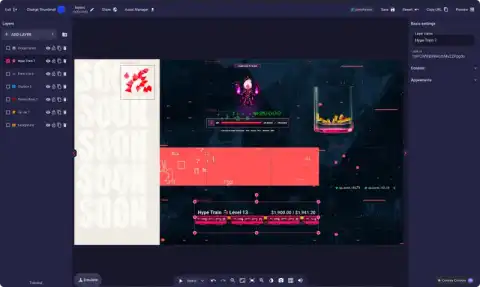
Hype Train Cross-platform hype meter that pools community support into levels, timers, and contribution momentum.
Bits, subs, gifts, super chats, donations, kicks, TikTok gifts, Ko-fi, Fourthwall, and Lumia events Optional source filters Twitch-native variable mirroring where supported Alerts and monetization
Stream Boss Viewer-versus-streamer HP bar game where stream events damage the current boss and the winner becomes the next boss.
Damage, heal, new boss, and defeat sounds Stage-based HP pools Chat command support Alerts and monetization
Train Count Compact streak counter for consecutive event chains such as subs, bits, tips, donations, and followers.
Momentum display Event-source driven streaks Compact alternative to a full hype train Alerts and monetization
Subathon Timer Stream marathon timer that grows from alerts and can be controlled by chat commands.
Adds time from configured events Chat controls for add time, pause, resume, and reset Milestones, max time, and themed presentation Streaming tools
Event List Live activity feed for followers, subs, gifts, donations, bits, raids, hosts, super chats, super stickers, stars, fans, shares, purchases, plugin events, and more.
Platform and category filters Vertical, horizontal, condensed, detailed, and marquee modes Never miss an alert from any connected platform Streaming tools
Event Rotator Cycles through selected recent events when a full event list is too large for the scene.
Compact one-event display Recent event rotation Useful for lower thirds and intermissions Styled live chat overlay with emotes, badges, avatars, usernames, platform icons, and animations.
Emotes and badges Classic and horizontal modes Multistream chat from every connected platform Floating chat emotes that animate across the stream.
Chat and alert reactions Random and styled emote motion Third-party emote support End-of-stream supporter roll with reorderable sections, custom templates, media, and audio.
Top supporters and recent event sections Custom section names, templates, prefixes, avatars, media, and audio Drag-to-reorder sections Streaming tools
Shoutout Clip Displays clip content for featured viewers or creators.
Shoutout event support Clip-themed presentation Raid and community spotlight use Streaming tools
Browser Source Embeds another web page or widget inside the overlay.
External widgets Custom hosted pages Normal Lumia layer positioning Streaming tools
Now Playing Music display for Spotify, YouTube Music, VLC, and plugin-powered now-playing sources.
Song title, artist, album, artwork, URL, and length Source-specific presets Auto-hide when nothing is playing Streaming tools
Now Playing Queue Shows the upcoming Spotify or YouTube Music tracks beside the current song.
Up-next queue display Spotify and YouTube Music sources Updates as the active track changes Streaming tools
Heart Rate Displays a live BPM readout from Pulsoid or HypeRate.
Live BPM data Pulsoid and HypeRate support Heart-rate themes for fitness and IRL streams Streaming tools
BRB Screen Full-screen be-right-back or intermission layer with clip and slideshow behavior.
BRB themes Clip slideshow behavior Full scene presentation Design building blocks
Text Static or dynamic text with typography, variable templates, highlights, and styling.
Fonts and colors Variable templates Highlight styles Design building blocks
Image Still images for logos, frames, sponsors, badges, and scene art.
Uploaded assets Positioning and transforms Scene composition Design building blocks
Video Motion graphics, loops, stingers, clips, and animated scene elements.
Video assets Looping visuals Aspect-ratio friendly sizing Design building blocks
Audio Audio-only layer for sounds, loops, and timed audio moments.
Audio assets Volume control Scene or alert workflows Design building blocks
Text-to-Speech Reads configured speech events, alerts, or messages with voice and volume settings.
TTS event feed Voice selection Volume settings Design building blocks
Live Caption Displays live spoken captions for readability and accessibility.
Live caption feed Text styling Readable stream captions Design building blocks
Camera Direct browser webcam layer that can be combined with other scene elements.
Browser webcam permission Webcam-in-overlay layouts Works with frames and shapes Design building blocks
Slideshow Rotates images or media for sponsors, merch, stream info, and intermission visuals.
Multiple media items Image rotator Scene banners and blocks Design building blocks
Shape Geometry for backgrounds, masks, dividers, frames, and scene accents.
Rectangle and shape primitives Background panels Borders, separators, and layout accents Design building blocks
SVG Vector artwork layer for logos, custom line art, icon marks, and scalable scene graphics.
Scalable vector artwork Scene marks and decorative graphics Pairs with images, text, and color boxes Design building blocks
Color Box Solid color panel for backgrounds, lower thirds, separators, framing, and composition blocks.
Solid fills Background and panel construction Fast scene structure without uploading artwork Design building blocks
Timer Countdown or timer for breaks, starting soon screens, events, and stream segments.
Countdown behavior Timer increments Compact or large scene display Design building blocks
Gradient Light Legacy Lumia gradient visual layer for older overlay designs.
Gradient visuals Direction controls Legacy overlay compatibility Progress bars for followers, subs, donations, bits, gifts, kicks, TikTok, views, chat count, heart rate, and custom targets.
Current and target values Variable-powered or custom progress Clear milestone text Goals and labels
Donation labels Latest, top, total, session, count, raw amount, and donor list readouts.
Currency symbols and amounts Session and all-time values Text and list presets Goals and labels
Twitch labels Followers, subs, gifts, bits, clips, channel info, category, viewer count, chat count, raids, avatars, and recent lists.
Latest, session, total, and recent-list values Channel metadata Lower thirds, goal headers, and dashboards Goals and labels
YouTube labels Subscribers, super chats, super stickers, members, gift members, view count, chat count, and recent lists.
Latest and session values Supporter names and counts Recent members and super chats Goals and labels
Kick, TikTok, and Facebook labels Followers, subscribers, gifts, kicks, viewers, shares, likes, stars, reactions, superfans, and chat counts.
Platform-specific values Latest supporter names and amounts Multistream readouts Goals and labels
Music and system labels Song title, artwork, artist, album, queue, requester, ordered items, OBS/SLOBS scenes, Streamer.bot actions, and BPM.
Now-playing metadata Scene and bot readouts Hyperate and Pulsoid BPM labels or goals Goals and labels
Kick, Twitch, YouTube, TikTok labels Platform-specific labels for Twitch, YouTube, Kick, TikTok, Facebook, and other supported stream destinations.
Follower, subscriber, viewer, chat, gift, and support counters Latest, session, total, and recent-list values One overlay scene for multistreaming labels Viewer interactions
Spinwheel Prize or decision wheel with items, images, quantities, and result display.
Up to 60 wheel items Game trigger support Winner result modal Viewer interactions
Raffle Entry and winner-selection layer for larger item pools.
Entry workflows Winner selection Game update support Live poll layer with start, update, reset, and result display.
Poll trigger events Result display Theme styling Viewer interactions
Viewer Queue Queue for viewers waiting to play, join, or be selected.
Game update events Presentation modes Community game lobbies Viewer interactions
Loyalty Leaderboard Points leaderboard for top viewers and loyalty standings.
Sorting modes Top viewer standings Lumia loyalty points Viewer interactions
Top supporter lists Top gifters, donors, cheerers, kicks, points, and achievement-focused profile list presets.
Always-on recognition panels Supporter rankings Pairs with goals and credits Viewer interactions
Viewer Profiles Viewer identity and stat display driven by profile list updates.
Profile list updates Viewer stats Achievement pairing Viewer interactions
Achievements Viewer achievement list for community progression.
Profile-focused lists Progression display Community achievements Viewer interactions
Tournaments Tournament standings and bracket-style competition data for community and game events.
Tournament standings Bracket and leaderboard presentation Game update support Custom and advanced
Custom Layer A community-built split-flap follower display created by binaryatlas, shown here as an example of what custom HTML, CSS, and JavaScript layers can do.
Featured community layer by binaryatlas Alert, chat, event, variable, OBS-style, and custom overlay events Variables, functions, config fields, and snippets Custom text, number, checkbox, dropdown, color, font, and slider settings Custom and advanced
HUDFX Video Cinematic video effects for screen takeovers and high-impact stream moments.
HFX event payloads Full-screen video effects Layered with media and alerts Custom and advanced
HUDFX Alert Full-screen HUDFX visuals that react to configured alert events.
Alert-driven HFX playback Screen takeovers High-impact supporter moments Custom and advanced
Group Layer Folder-style layer for organizing, moving, expanding, collapsing, and showing or hiding multiple child layers together.
Move children together Show or hide grouped layers Organize complex overlays  Lumia Stream Overlays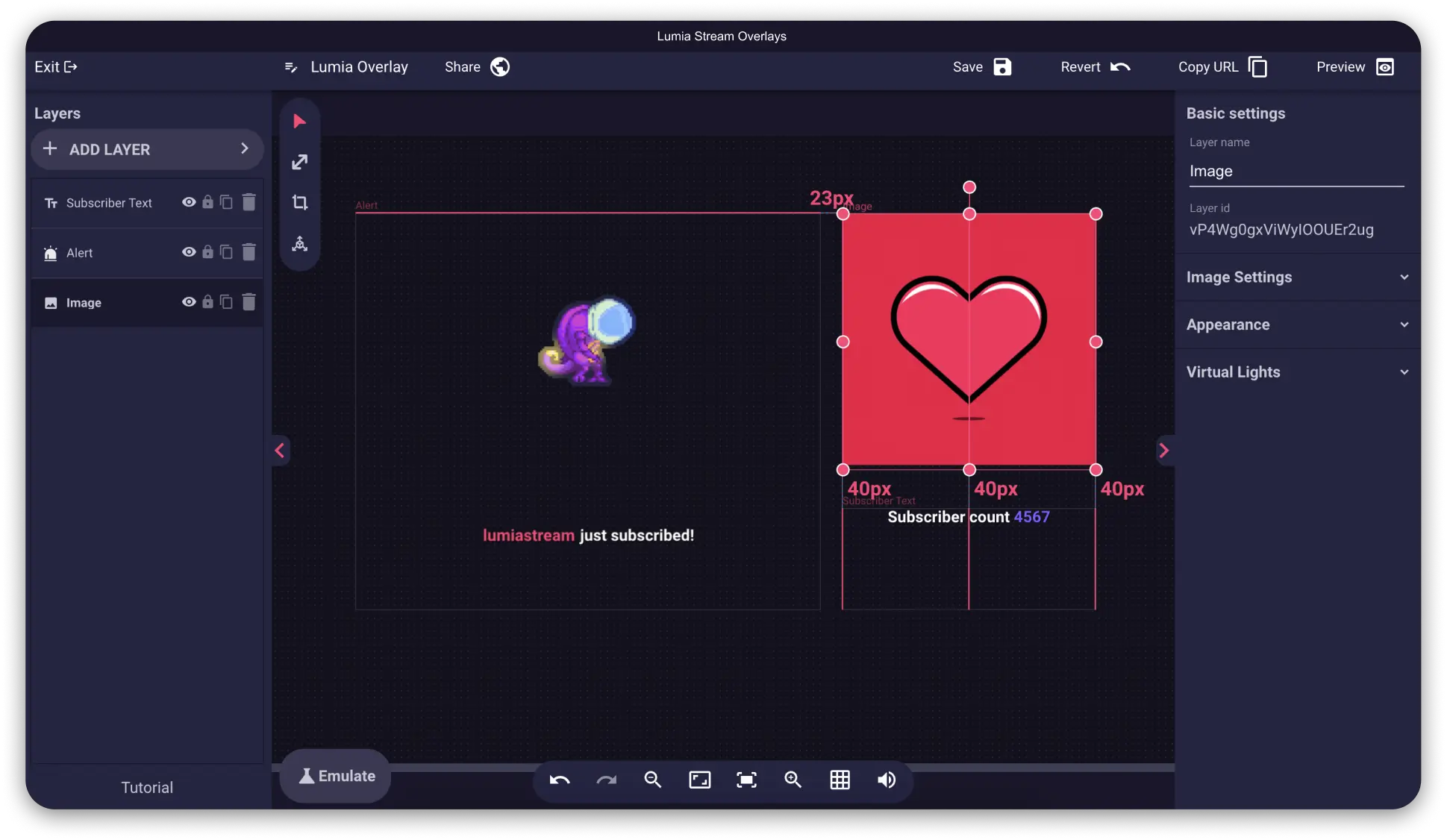





 Windows
 Mac
Mac Linux
Linux